WordPress plugin for Guesty Squarespace widget For operators & developers

Your listings. Your brand. Booked direct on your own website.

A direct-booking plugin for Guesty operators. It pulls your listings, live availability and real pricing straight from the Guesty API into a fast, branded booking experience on your own WordPress or Squarespace site, where the reservation belongs to you.
Every operator has the listings. Few have a booking engine to rival the OTAs

THE GAP THIS CLOSES

You already maintain your listings, photos, calendars and pricing in Guesty. What most operators lack is a way to take a booking on their own website without handing the guest to an OTA or a generic checkout.

Our direct-booking plugin closes that gap. Installed as a WordPress plugin for Guesty, or a Squarespace widget, it gives you a search experience, a results page, and a full page for every active listing, all rendered inside your own site and drawn live from the Guesty API. The reservation lands back in Guesty as a direct booking that belongs to you.

Search, filter and browse the whole portfolio

The search experience

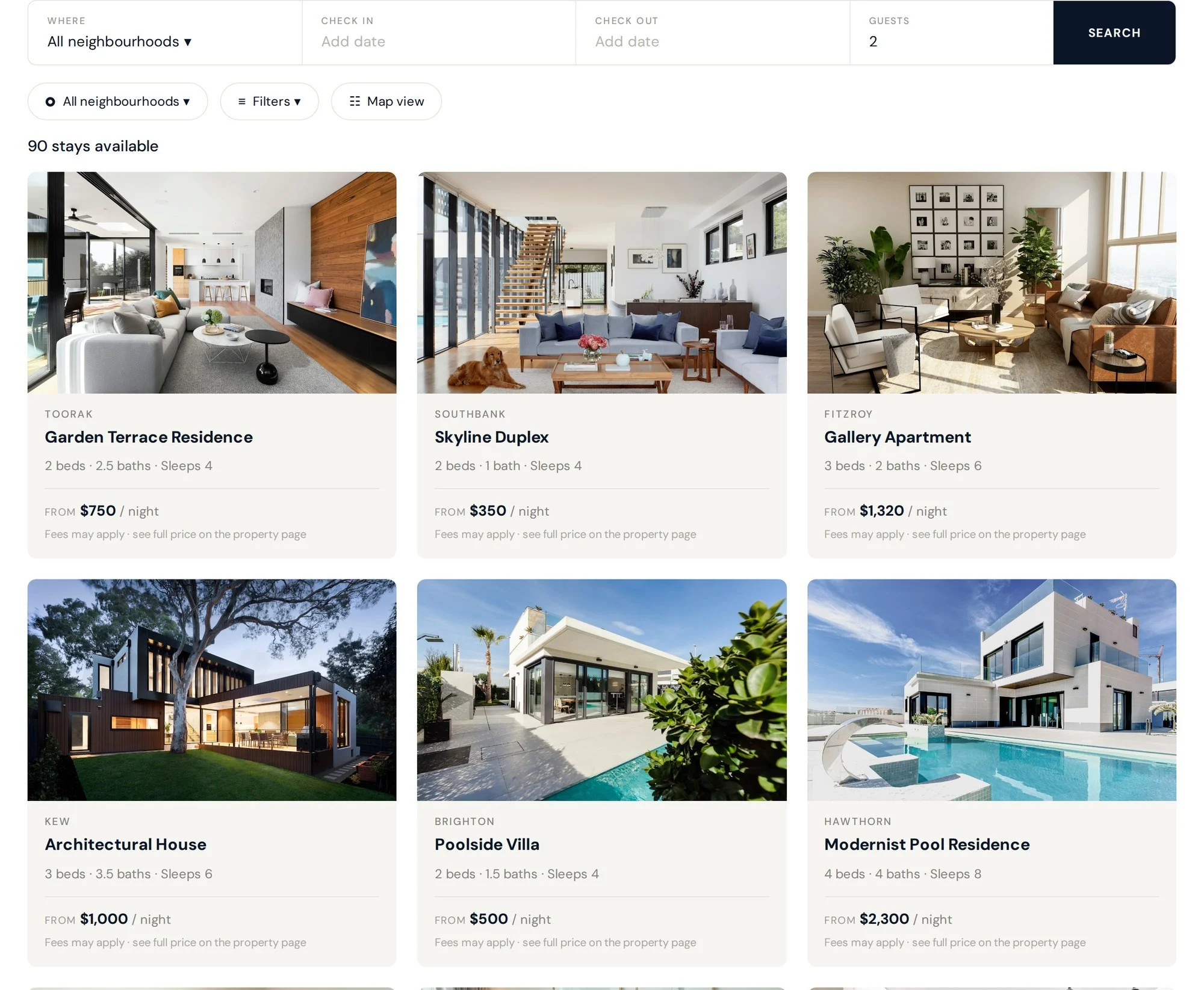
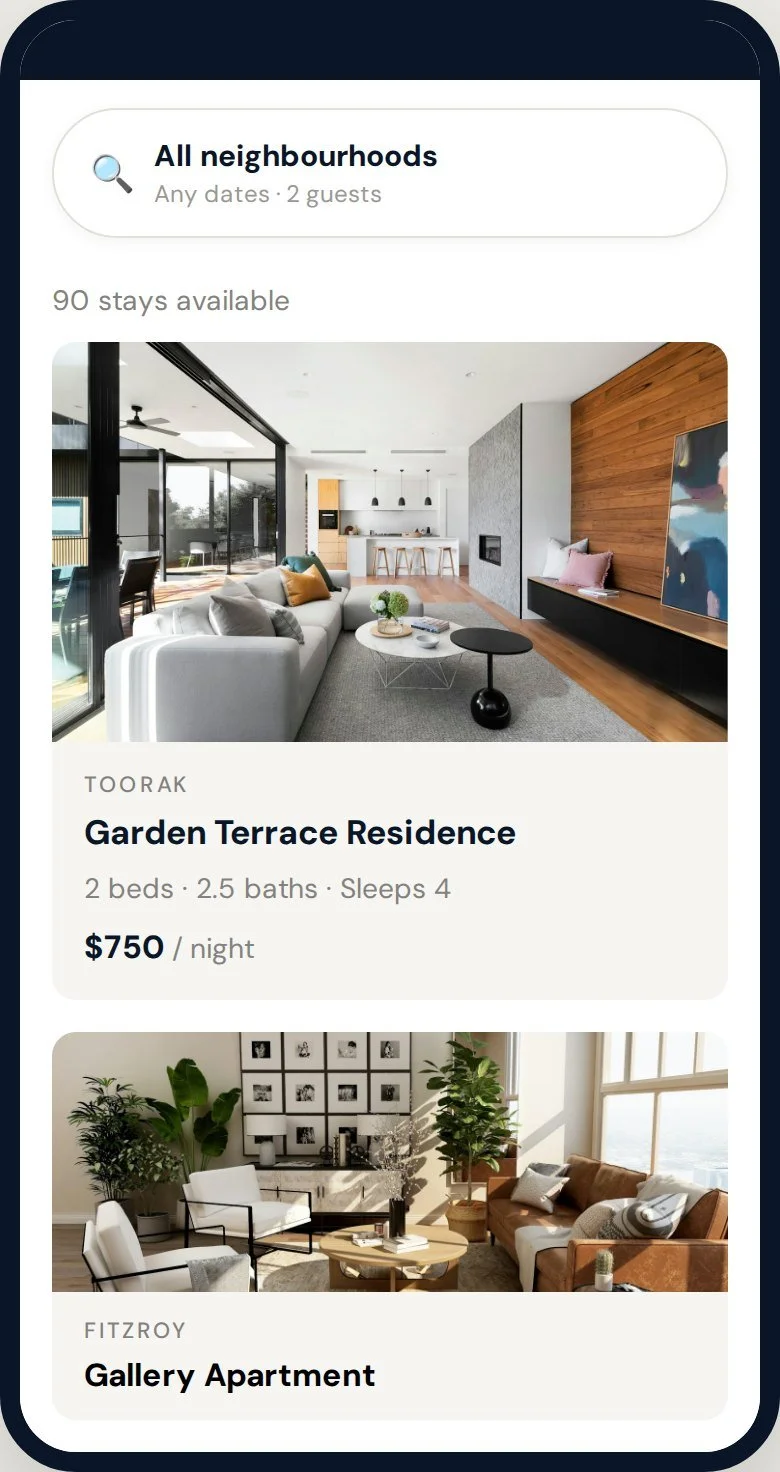
The Guesty WordPress plugin places a branded search bar on any page, where, dates and guests, with neighbourhood filters drawn from your own suburbs and a live results grid that updates as guests narrow their search. Every card pulls its photo, title, specs and nightly rate live from your Guesty listing, so the grid is always current.

  • Neighbourhood search from your actual suburbs
  • Clean date-range calendar that enforces minimum nights
  • Amenity filters you curate to the ones guests care about
  • Live result count, list and map views, per-property currency
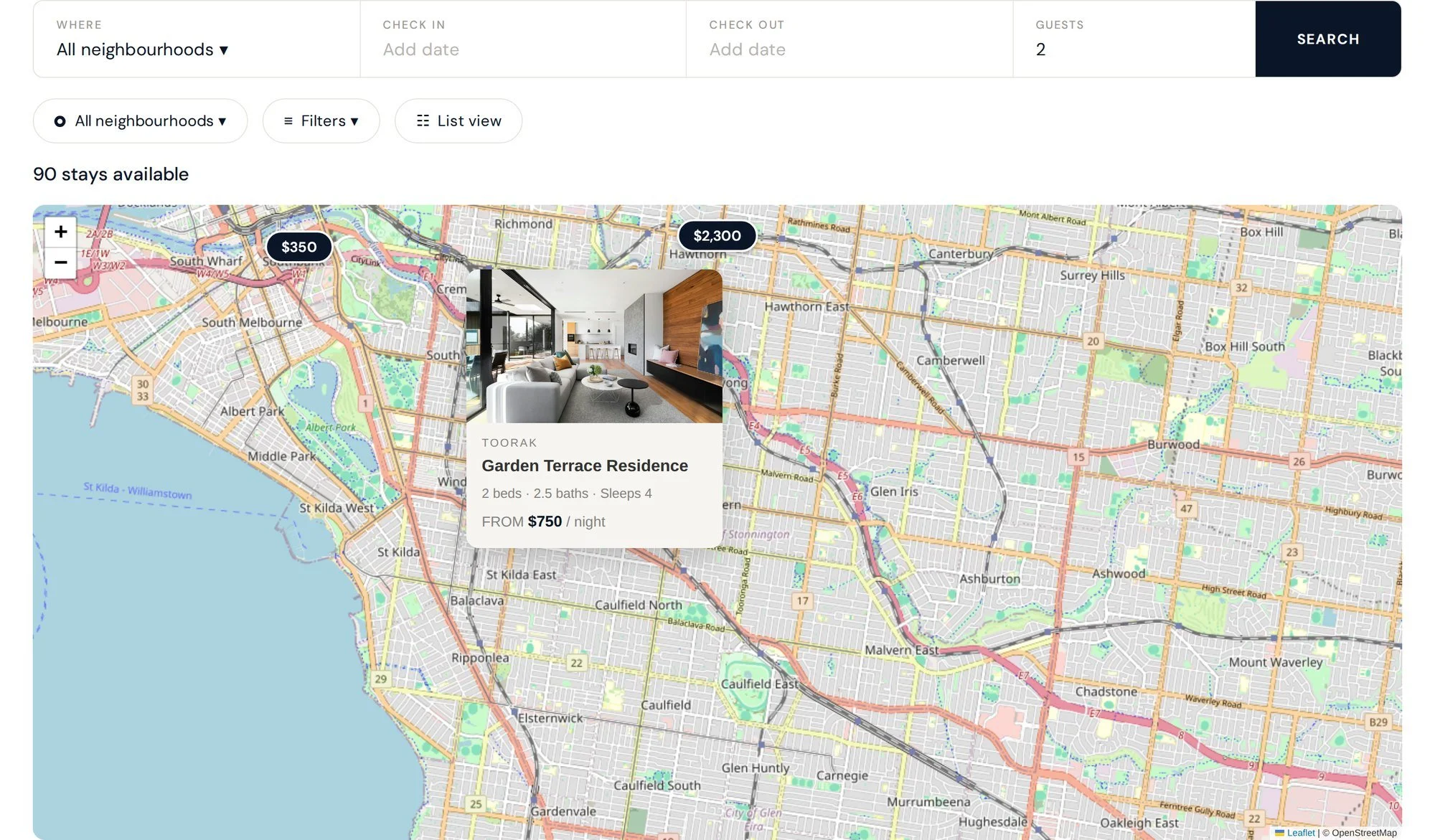
Compare by location and price, the way guests already do

The map view

For portfolios of any size, the map shows each property as a branded price pin. Guests tap a pin to open a preview card and click straight through to the full property page.

  • Branded price pins, preview cards, live filtering
  • Free OpenStreetMap out of the box, no map billing
  • Optional Google Maps with your own API key
  • One control switches the whole results area between grid and map

A complete listing page, generated automatically

the property page

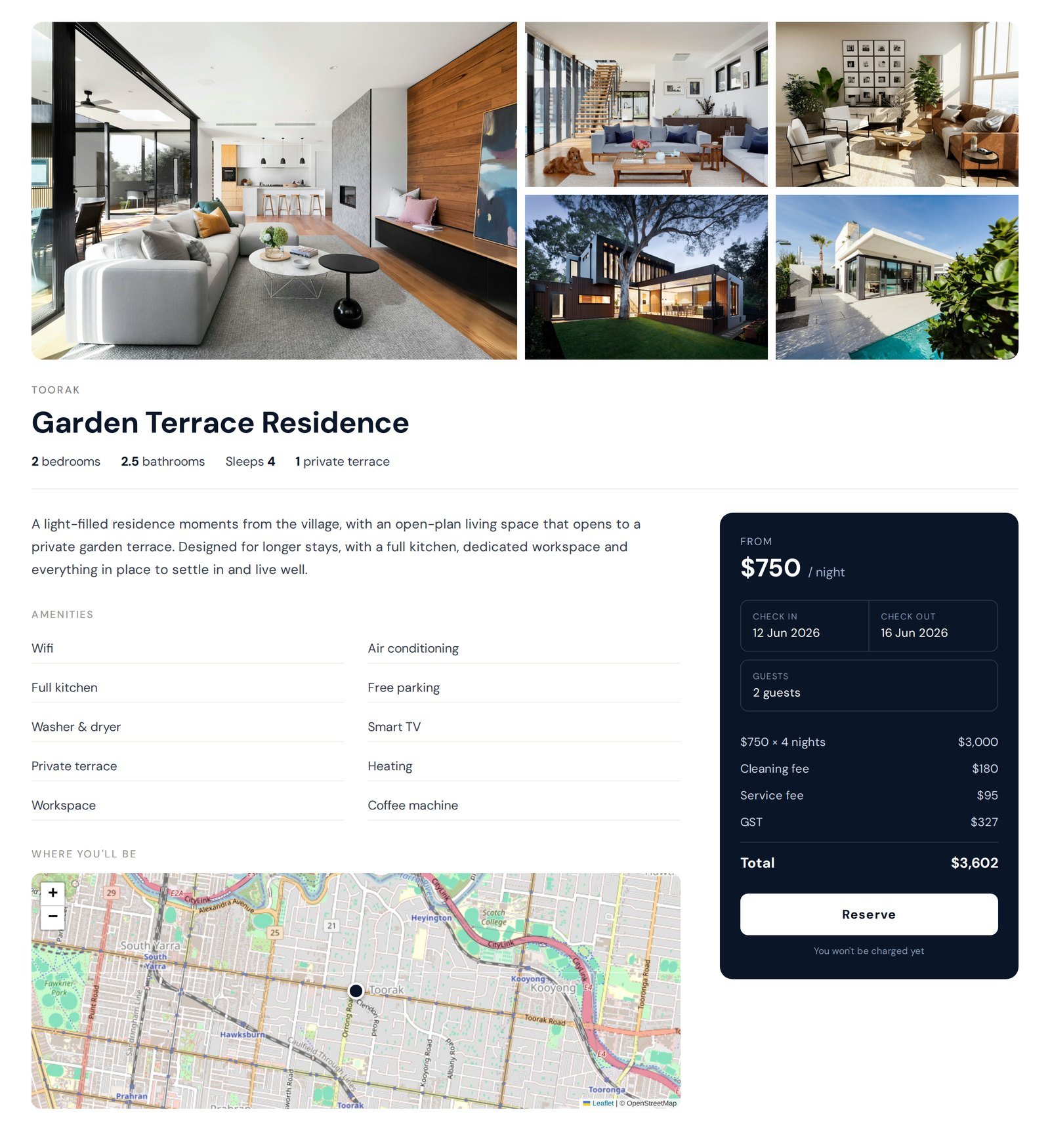
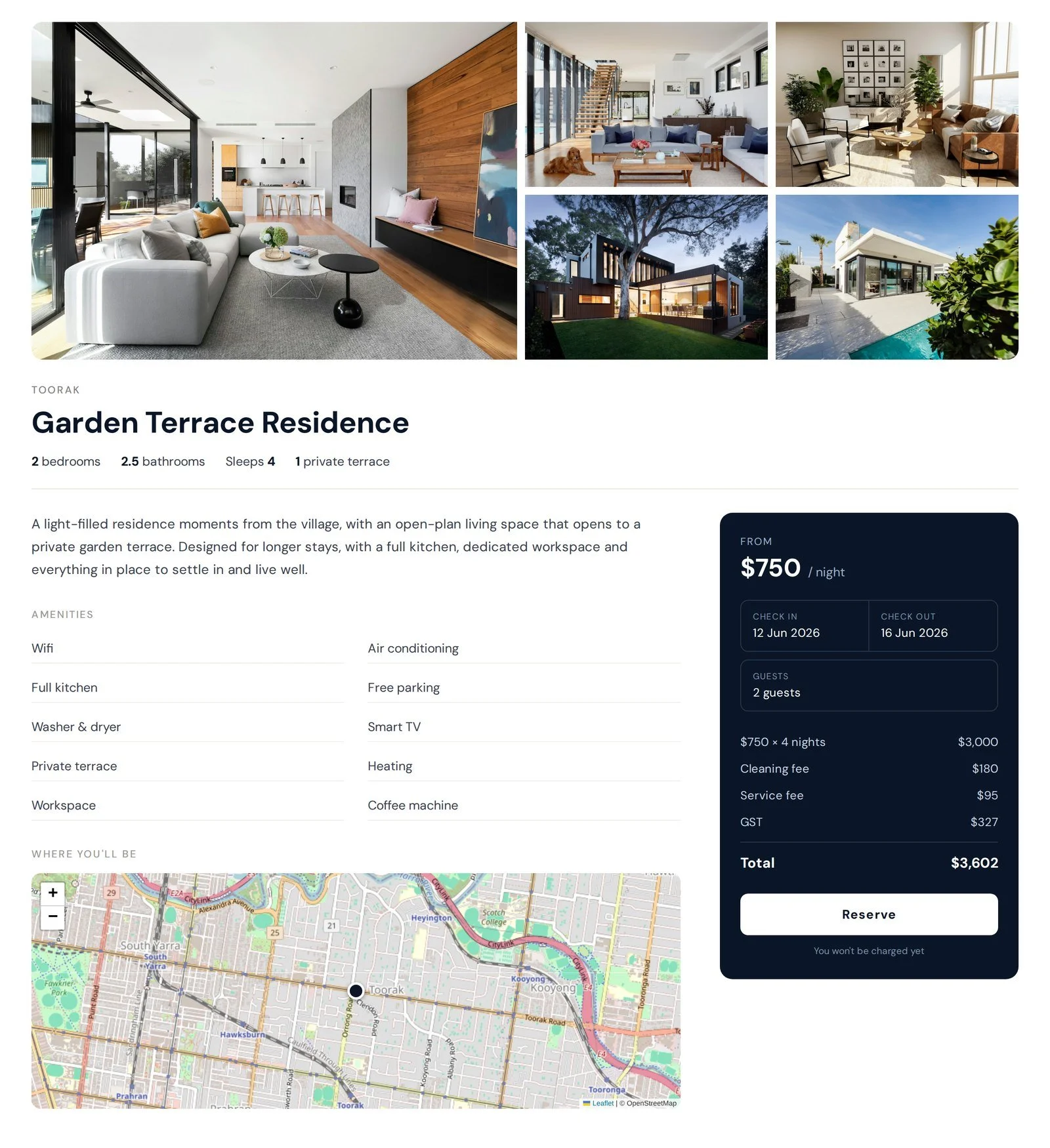
For every active listing, the plugin generates a full property page from its Guesty data: gallery, description, amenities, specs, a location map, and a live booking panel that quotes the real total with fees and taxes through the Guesty API. No manual page-building, no copy-pasting descriptions. When the listing changes in Guesty, the page updates automatically. The pages are real, indexable pages on your own domain, so they build SEO equity for your brand instead of an OTA's.

  • Photo gallery with full-screen lightbox
  • Live booking panel with the real, all-in price
  • Amenities, specs and description straight from Guesty
  • Already have property pages? They can be matched, not duplicated
Branding & flexibility

It takes on your brand completely.
And it stays open to your developer.

No technical skills needed

Set up through plain settings

Inherit your website's fonts and colours automatically so it blends straight in, or override any part, colours, fonts, corner radius, density, button style, to match your brand guidelines exactly. No code for the common cases. Nothing looks like a third-party widget bolted on.

Built for developers too

The outputs are fully open

If you have a developer, or you are one, you are not boxed in. The markup, styling and layout are open: change them as much as you like to suit your own design. Drop the booking experience anywhere with a single line.

[tac_search] · [tac_quote] · [tac_calendar months="2"]

getting started

Four simple steps

1

Have a call

A short call to see your portfolio and confirm it is the right fit.

2

Install

Add the WordPress plugin or the Squarespace widget to your existing site.

3

Connect

Link your Guesty account once. Listings, photos and availability sync in.

4

Go live

Switch on direct booking on your own domain, fully branded.
Built for the way guests actually browse

Mobile experience

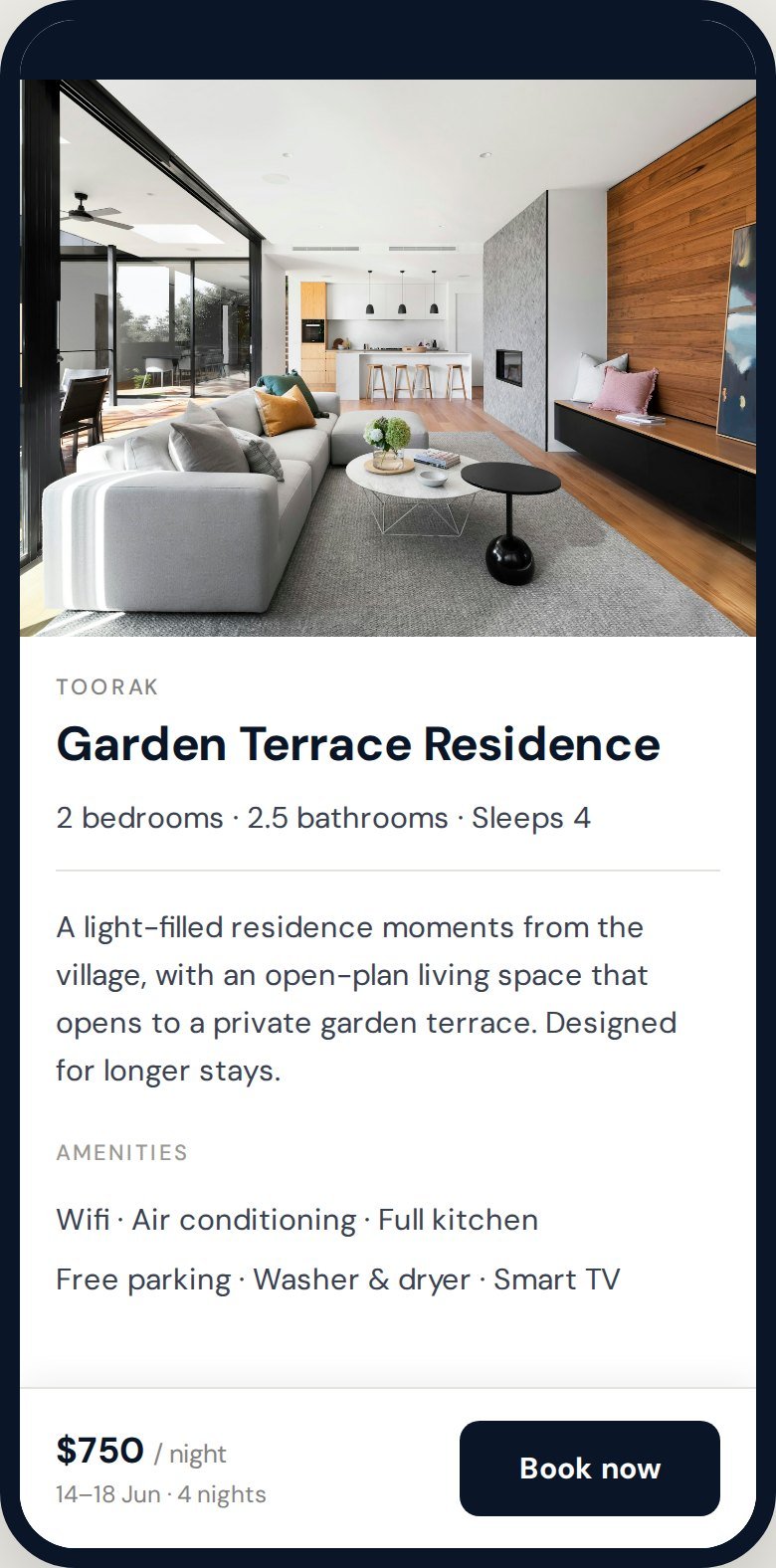
Most accommodation searches happen on a phone, so the mobile experience is designed for it, not squeezed into it. A collapsing one-line search, a persistent book bar, and the full calendar and map, all responsive from desktop down to phone.

Direct booking for Guesty, answered

Questions

About the plugin

What is Direct Booking for Guesty?
Direct Booking for Guesty is a direct-booking plugin built by The Accommodation Co. for Guesty operators. It installs as a WordPress plugin for Guesty, or as code blocks on Squarespace, Wix and Webflow, and adds a branded search, map and property-page booking experience to your own website. It pulls listings, live availability and real pricing straight from the Guesty API, and reservations land back in Guesty as direct bookings.
Who is the plugin for?
It is for independent accommodation operators who manage their properties in Guesty and want to take direct bookings on their own website rather than relying on OTAs. It suits short-term rental managers, serviced-apartment operators and boutique hotels. It is also built for their web developers, who can take the plugin's output and customise it freely.
How is this different from an OTA or a channel manager?
A channel manager like Guesty distributes your listings to OTAs and keeps your calendars in sync. This plugin is the missing piece on your own website: it lets a guest search, see live pricing and book directly with you, on your domain, with no OTA commission and no third-party checkout in the middle. It works alongside Guesty, not instead of it.
Do I still need Guesty?
Yes. The plugin is a direct-booking layer on top of Guesty, not a replacement for it. Guesty remains your source of truth for listings, photos, calendars, pricing and reservations. The plugin reads from the Guesty API and writes bookings back into Guesty.

Setup and platforms

Is there a WordPress plugin for Guesty?
Yes. The WordPress plugin for Guesty is available now. You install it on your existing WordPress site, connect it to your Guesty account once, and your listings appear as branded, bookable pages. There is no separate booking site to maintain and no rebuild of your existing site.
Does it work with Squarespace?
Yes, and it is live today. On Squarespace the booking experience is delivered as code blocks added to the pages you already have, so your design, your content and your URLs stay exactly as they are. Sun Haven Collection run ten homes across Florida and Arizona this way, with search, live pricing and availability on their own Squarespace site.
Does it work with Wix or Webflow?
Yes. The same approach used on Squarespace works on Wix, Webflow or any site that lets you add a block of code to a page. You keep the site you have, and the search, availability and live quote appear inside it. If you are on one of these platforms, book a call and we will walk through how it would sit on your pages.
Do I need to rebuild my website?
No, and that is the point. Whether you are on WordPress, Squarespace, Wix or Webflow, the booking experience goes onto the site you already have. No migration, no new template and no second booking site running alongside your real one.
How do I install and connect the Guesty WordPress plugin?
You install the plugin on your WordPress site, then a short guided setup screen links it to your Guesty account. Once connected, your listings, photos, amenities and availability sync in automatically and stay current. Most operators are set up in a single short session, often on the same call.
Do I need technical skills to use it?
No. Everything is configured through plain settings, with no code required for the common cases. You connect Guesty, choose what to show, and the plugin handles the rest. If you can manage a WordPress site, you can run this.
How long does setup take?
Setup is deliberately light: install the plugin, connect Guesty once, and switch on direct booking. For most portfolios this is a matter of a short session rather than a project. Larger or more complex portfolios may take a little longer to configure exactly how you want.

Features

Does the plugin show live availability and pricing from Guesty?
Yes. Search results and property pages read live from the Guesty API, so guests always see true availability and an up-to-date nightly rate. The property-page booking panel returns the full quote, including fees and taxes, for the dates the guest selects.
Are fees and taxes included in the price guests see?
Yes. The property-page booking panel quotes the real, all-in total for the selected dates, with cleaning fees, service fees and taxes itemised, so guests see the true price before they book. No surprises at checkout.
Can guests book directly, or only enquire?
Both. Where a property is set up for online booking, guests book directly and the reservation flows back into Guesty. Where dates are sold out, or a property is not yet wired for online booking, the plugin offers a clean enquiry path instead of a dead end, routed to your nominated email.
Is there a map view?
Yes, and there are three ways to show it. Guests can browse plain cards, a full map, or a split view with the map on one side and the results on the other, where hovering a property lights up its price pin and clicking a pin jumps to the property. You can let guests switch between all three, lock a page to one, or turn the map off entirely. It uses free OpenStreetMap out of the box with no map billing, and you can switch to Google Maps with your own API key if you prefer.
Does the map show exact property addresses?
Only if you want it to. By default the map shows an approximate location within a radius you set, which is what most short-stay operators need, since the exact address should not be public before a booking is made.
Can guests sort and filter the results?
Yes. Guests can filter by dates, guests, area, amenities and your own tags, and sort the results. Long portfolios paginate rather than loading endlessly, so a large collection stays quick to browse on any device.
Can I group properties into areas?
Yes. Suburbs can be grouped into areas that make sense to a guest rather than to a mapping service, so a guest searching a city sees the areas they actually recognise. You can create as many groups as you need.
Can I highlight special offers?
Yes. Promotions set in Guesty carry through to the site, and guests can filter the results down to properties with a special offer, which makes a promotion something you can point a campaign at rather than something buried in a rate plan.
Can I add video to a property page?
Yes. A property page can carry a video alongside the photos, and you can also place a video on any page you build yourself. It is a strong differentiator on a luxury or design-led portfolio where photos alone undersell the property.
Does it suggest other properties to a guest?
Yes. A property page can show similar properties, matched on area, tags and amenities in the order of priority you choose. It keeps a guest who is not quite sold on one property inside your site rather than back on an OTA.
Does it work on mobile?
Yes. The mobile experience is designed for phones, not squeezed into them: a collapsing one-line search, a persistent book bar on property pages, and the full calendar and map. The split view collapses to a card list with a full-screen map a tap away. Everything reflows cleanly from desktop down to phone.
Can I handle properties in different currencies?
Yes. Each listing shows its own currency, with a clear note, which suits cross-border portfolios that operate in more than one country.
Can I create landing pages for specific suburbs or themes?
Yes. The plugin includes shortcodes so you can build pre-filtered landing pages, for example a page that shows only one suburb, or only pet-friendly stays, with the filter locked so the page stays on theme. These are real indexable pages, ideal for SEO and marketing campaigns.
Can I build a page of hand-picked properties?
Yes. You can tag a set of properties and give them their own page, which is how operators build collections such as beachfront homes, dog-friendly stays or a corporate portfolio. A collection can be kept out of the main search if it is only meant for the guests you send to it.
Can I put a search bar on my homepage?
Yes. A search bar can sit on its own, over a hero image or anywhere else on the site, and send the guest through to your results page. It is the same search the results page uses, so the two always behave the same way.
What happens when a listing is removed from Guesty?
You choose. When a listing leaves Guesty, its page on your site can be flagged, set to draft, or removed automatically, so your site never shows a property you no longer manage.

Branding and customisation

Will it match my brand?
Completely. The plugin can inherit your website's existing fonts and colours so it blends straight in, or you can override any part, brand colour, accent, fonts, corner radius, spacing density and button style, to match your brand guidelines exactly. Nothing looks like a third-party widget bolted on.
Can we keep our own property page design?
Yes. As well as producing property pages for you, the plugin can be used as components inside a template your own developer controls, so the page is theirs and only the booking parts are ours. Goodwins Real Estate in Auckland run it this way, with short-stay properties sitting inside the same page design as the rest of their site.
Can my developer customise the plugin's output?
Yes. The plugin is built for developers as well as operators. The markup, styling and layout are fully open, so a developer can change the output as much as they like to suit a custom design. Each part of the booking experience, the search, the results, the availability calendar, the quote and the individual content blocks, drops onto any page with a shortcode, and the admin includes a builder that generates the shortcode for you.
Can I choose which sections show on a property page?
Yes. Sections such as the amenities list, the location map, the video, the host note and the booking panel are individual toggles, so each page shows only what is relevant to your portfolio.

SEO and getting started

Is it good for SEO?
Yes. The plugin produces real, fast, indexable property pages on your own domain, with clean URLs and proper structure, so they build search equity for your brand. Pre-filtered suburb and theme landing pages give you additional indexable pages to rank for specific searches. On Squarespace, Wix and Webflow your existing pages keep their rankings, because the booking is added to them rather than replacing them.
How do I get started?
Book a call. We will look at your portfolio, show you a live demo on your platform, and walk through what it would look like on your own site. Just a conversation about fit.

See it running on your own portfolio.

get in touch for a live demo

Built by an operator, for operators on Guesty. Book a call and I will walk you through a live demo and what it would look like on your site.

For developers and agencies

Implementation guide

Everything needed to build or redesign a site on the plugin: the two integration models, the full shortcode reference, theming, booking patterns, SEO and the Guesty checkout boundary.